What Does Mute Mean on Instagram? A Complete Guide (2025)

Sometimes Instagram can feel too full. Maybe a friend posts too many photos or someone shares dozens of stories every day. That’s where the mute feature comes in. When you mute someone, you still follow them, but their posts or stories won’t show up in your feed. It’s like turning down the volume without unfollowing or blocking them.
Muting is private and simple. The person you mute will not know, and you can still message or like their posts if you visit their profile. According to the Instagram Help Center, you can mute posts, stories, or even notes. This makes it one of the best Instagram privacy options for controlling what you see.
What Does Mute Mean on Instagram?
Muting on Instagram means you hide someone’s posts or stories without unfollowing or blocking them. It’s like turning down the volume on their updates. You still follow them, and they can still see your posts, but you won’t see their new content in your feed or story bar. Instagram explains in their Help Center that muting helps you control what shows up in your feed without hurting your connections.
Muting is different from unfollowing or blocking. If you unfollow someone, you stop seeing their posts completely, and they might notice. If you block someone, they can’t see your profile or talk to you at all. Muting is private—only you know you did it. You can still send messages and interact, but you won’t see their updates unless you visit their profile.
I’ve used the mute button myself when a friend posted too much. They would share dozens of stories every day, and it made my feed feel overwhelming. I didn’t want to unfollow them and risk hurting their feelings, so I muted their stories instead. It made Instagram more enjoyable for me while keeping our friendship the same. That’s why muting is often called the “soft way” to manage content.
What Happens When You Mute Someone on Instagram?
Muting on Instagram is like turning down the volume on a person without cutting them off. When you mute, their posts or stories won’t show up, but you still follow them. This makes it softer than blocking or unfollowing. I use it when I want less noise in my feed but don’t want to upset anyone.
You Won’t See Their Posts in Your Feed
If you mute someone’s posts, their photos and videos will no longer show in your feed. But their profile is still there, and you can visit it anytime. This is great if a person posts too much, or shares things that don’t interest you every day. I once muted a friend who was posting every hour—it helped me scroll in peace but I could still check their page when I wanted.
Related terms: hide Instagram posts, mute feed posts, stop seeing posts without unfollowing
You Won’t See Their Stories at the Top
When you mute stories, their circles disappear from the story bar at the top of Instagram. That means their daily updates won’t pop up first. This helps when someone shares too many clips that clutter your screen. I’ve done this with a few accounts that post 20+ stories a day—it made my app feel lighter and easier to use.
Related terms: mute Instagram stories, hide Instagram story, stop seeing stories on Instagram
They Won’t Know They’ve Been Muted
The person you mute will not get a message about it. From their side, everything looks the same. They can still like your posts, reply to your stories, and see your profile. This makes muting private and stress-free. You can take control of your feed without hurting feelings or causing drama.
Related terms: does Instagram notify when muted, Instagram mute privacy, silent mute feature
You Can Still Message Them
Muting does not stop direct messages. You can still chat, send photos, and reply to each other’s DMs. This means you can stay close in private while muting their public posts or stories. I’ve done this when I liked talking to someone but wasn’t into what they shared every day—it gave me balance.
Related terms: mute messages Instagram, Instagram mute notifications, can I message if muted
You Can Choose to Mute Posts, Stories, or Both
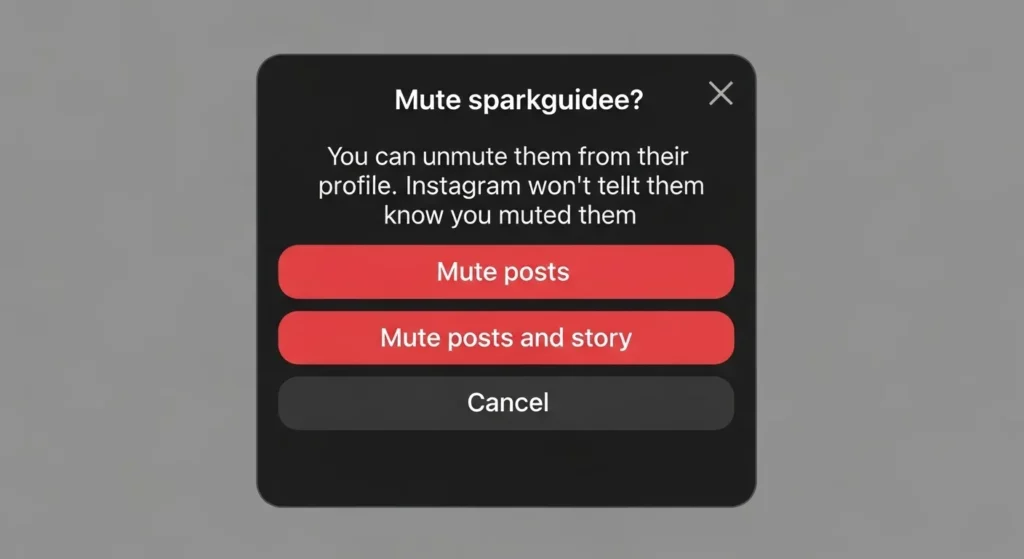
Instagram lets you pick what you want to mute. You can mute just posts, only stories, or both. This makes it flexible for your needs. For example, you may like someone’s stories but not their feed, or the other way around. I often mix it up depending on the person, so I only see the content I care about.
Related terms: mute Instagram options, mute stories and posts, customize Instagram mute
How to Mute Someone on Instagram (Step-by-Step)
Sometimes you don’t want to unfollow someone, but you also don’t want to see everything they post. That’s when the mute button comes in handy. It hides their posts or stories without removing them from your friends list. Here are three simple ways you can mute someone.
From Their Profile
Go to the person’s profile and tap the “Following” button. A menu will pop up, and you’ll see the option to Mute. From there, you can mute their posts, stories, or both.
I’ve done this with friends who post all the time. I didn’t want to unfollow them, but muting gave me a break from their updates while still staying connected.
From Your Feed
If a post shows up that you don’t want to see, tap the three dots (⋮) in the top-right corner of the post. Then choose Mute. Instagram will ask if you want to mute only posts, only stories, or both.
I like this method because it’s fast. If I’m scrolling and something feels too much, I can mute right away without visiting their profile.
From Stories Bar
At the top of Instagram, you see people’s stories in little circles. If you don’t want to see someone’s stories anymore, press and hold their circle. You’ll see an option to Mute Story.
I’ve used this when someone posts 20 stories in one day. Instead of skipping each one, muting their story makes my feed feel cleaner and less crowded.
How to Unmute Someone on Instagram
Sometimes you mute a person for a while and later decide you want to see their posts or stories again. Unmuting them is very easy. Just go to their profile, tap the “Following” button, then choose “Mute.” Here you can turn off the mute for posts, stories, or both. After this, their posts will show up in your feed and their stories will appear at the top again.
There’s also another way to unmute. If you muted their stories, scroll to the far right of your story bar, hold down on their profile picture, and tap “Unmute Story.” You can also search for their profile, tap the three dots on one of their posts, and choose “Unmute.” Instagram explains these steps clearly in their Help Center.
From my own experience, I once muted a close friend when I was busy studying and needed fewer distractions. Later, I unmuted them, and their updates started showing again right away. It felt like I was catching up on everything I missed, without any awkwardness. That’s the best part of this feature—you can take a break without losing the connection, and bring their content back whenever you’re ready.
Difference Between Mute, Block, Restrict, and Report
Instagram gives you different tools to control how people interact with you. The main ones are Mute, Block, Restrict, and Report. Each works in a different way, so knowing the difference helps you choose the right option for your situation.
Mute vs Block
When you mute someone, you just stop seeing their posts or stories. They can still see your posts and send you messages, and they won’t know you muted them. Blocking is much stronger—it makes your account invisible to that person. They can’t find your profile, posts, or stories at all.
I often use mute for friends who post too much, because I don’t want to hurt their feelings. But if someone is being rude or spammy, blocking is the best choice. Think of mute as turning off the noise, and block as locking the door.
Mute vs Restrict
Restricting someone is like putting them in a quiet corner. If they comment on your post, only they can see it unless you approve it. They also won’t know if you’ve read their messages or when you’re online. Muting, on the other hand, only changes what you see.
I once restricted someone who always left negative comments. I didn’t want drama, so instead of blocking, I restricted them. That way, they thought their comments were public, but only I could see them.
Mute vs Unfollow
When you unfollow someone, their posts and stories disappear from your feed, and you’re no longer following them. They may notice this and feel awkward about it. Muting is softer—you still follow them, but their posts and stories don’t show up for you.
I muted a close friend once during a busy work week because their travel photos kept distracting me. Later, I unmuted them when I had more free time. If I had unfollowed them, they might have taken it the wrong way.
Mute vs Report
Reporting is very different from muting. Muting only hides posts and stories from your feed. Reporting is for serious problems, like spam, scams, bullying, or harmful content. When you report, Instagram reviews the account or post, and they may remove it.
I once reported a fake account pretending to be a famous brand. Muting wouldn’t help, because others could still get tricked. Reporting protects not just me, but also the whole Instagram community.
Can You Tell If Someone Muted You on Instagram?
The truth is, Instagram does not tell you if someone muted you. There are no alerts, no messages, and no special icons. Muting is private, and that’s the point—it lets people hide posts or stories without making it obvious. You can still like their photos, comment, and send messages just like before.
Still, you might notice small clues. If a person who usually watches your stories or likes your posts suddenly stops, you may wonder if they muted you. But be careful—this doesn’t always mean you were muted. Sometimes people are busy, they follow too many accounts, or they just don’t spend much time on Instagram anymore.
I remember thinking a close friend had muted me because they stopped watching my stories. Later, I found out they had deleted the app for a while. That experience taught me not to assume too fast. If it really matters, the only way to know is to ask them directly.
Why Do People Mute Others on Instagram?
One big reason people mute others is too many posts. Some friends or accounts post a lot in one day, and it can fill up your feed fast. Muting helps you keep your feed calm without unfollowing them. I’ve done this with a close friend who shares every meal and workout. I still care about them, but I don’t need to see every single update.
Another reason is setting personal boundaries. Social media can get tiring when you see too much. Muting lets you take a break without starting drama. I once muted a family member because their posts made me feel guilty about my own choices. Muting gave me peace of mind and kept our relationship fine offline.
People also mute to avoid drama. Maybe someone is posting negative things, or you’re giving space to a friendship. Muting lets you step back while staying connected. Experts, like those at the American Psychological Association, say managing what you see online can lower stress. It’s a simple way to keep Instagram a healthy and positive place for you.
FAQs (Frequently Asked Questions)
If I mute someone, can they still see my posts?
Yes. Muting only hides their posts and stories from your feed. It does not hide your content from them. They can still like your photos, watch your stories, and visit your profile. I’ve done this myself when I needed a break from a friend’s posts but didn’t want to unfollow them. Instagram also says in their Help Center that muting is private, so they never get a notification.
Can I mute someone’s messages only?
Yes. You can mute someone’s messages in Direct Messages (DMs). This means you won’t get alerts when they text you, but the messages will still appear in your inbox. I often use this in group chats that get too busy. It helps me stay focused without leaving the chat or missing what’s important. You can still open the chat anytime to read and reply.
Does muting reduce notifications?
Muting only stops the notifications you choose. If you mute posts or stories, they won’t show up in your feed. If you mute messages, you won’t get alerts when they text you. But if they comment, like, or tag you, you’ll still see those notifications. From my own use, muting makes Instagram quieter without cutting someone off completely.
Final Thoughts
Muting is a simple way to manage what you see on Instagram. It lets you keep peace in your feed without hurting anyone’s feelings. I’ve found it really useful when I want less noise online but still want to stay connected.
You don’t have to unfollow or block someone just to get a break. With mute, you can choose to hide posts, stories, or messages and still keep your friendships. That’s why I see it as one of the most helpful features Instagram gives us — it’s control without conflict.