What Does This Mean on Instagram? A Complete Guide to Instagram Symbols & Icons

Instagram uses lots of small signs and icons to show what’s happening on the app. These symbols are like shortcuts. Instead of reading long text, you can quickly understand if someone is online, if a story is new, or if there’s a problem when you post.
That’s why this guide is here. I’ll walk you through the most common Instagram symbols and explain them in simple words. By the end, you’ll know exactly what these signs mean and how to use them to make your Instagram experience easier.
What Does “This” Mean on Instagram?

Instagram, the word “this” can point to many little signs you see in the app. It might be a hashtag (#), a green dot, a colored circle around someone’s story, or even a red exclamation mark. Each of these symbols has a job. They tell you what’s happening with your account, your posts, or your friends. If you don’t know what they mean, it can be confusing.
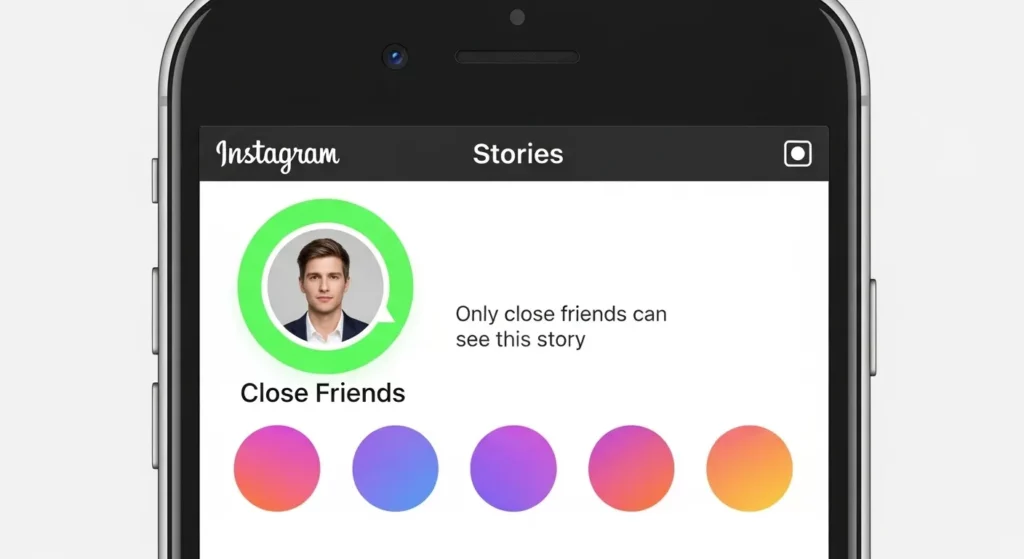
I remember the first time I saw a green circle around a friend’s story. I thought Instagram had changed the design. Later, I found out it meant I was on their Close Friends list. That small circle actually showed that I was trusted enough to see more private posts. Little signs like that can change how you understand your friendships online.
These symbols are like Instagram’s secret language. A green dot means someone is online. A red exclamation mark in your messages usually means something went wrong, like bad internet or too many hashtags. Once you know what the signs mean, Instagram feels easier to use. You don’t have to guess—you just read the signals.
What Are Hashtags?

A hashtag on Instagram is a word or short phrase with the # sign in front of it, like #Travel or #Food. When you add a hashtag to your post, Instagram puts it in a group with other posts that use the same tag. This makes it easier for people to find your post when they search or tap on that hashtag.
I remember when I posted about a local event in Jaranwala Tehsil. I added #JaranwalaTehsil, and soon people I didn’t even know started liking my post. The hashtag helped me connect with people who cared about the same event.
Hashtags also let you join bigger conversations. For example, if you post a picture of food and use #Foodie, your post can show up for anyone looking at that tag. It’s like putting your picture in a community photo album where everyone can see it.
Why Do Hashtags Matter?
Hashtags are important because they help more people see your posts. Instagram uses hashtags to figure out what your post is about and then shows it to people who might like it. If you use the right hashtags, your post might even show up on the Explore Page, where lots of people discover new content.
At first, I made the mistake of adding too many hashtags—almost 30 every time. My posts didn’t do well, and I learned that Instagram works better when you use fewer but more relevant hashtags. Now I usually use 5–10 hashtags that match my photo, like #TravelPhotography, and I see more real likes and comments.
Think of hashtags as labels. They sort your post into the right “folder” so the right people can find it. Whether it’s a small hashtag like #JaranwalaTehsil or a big one like #Travel, using them the right way helps you reach the people who care.
What Is an Instagram Mention?

On Instagram, a mention happens when someone types the “@” symbol and your username (like @yourname). This makes your name clickable, so people can tap it and go straight to your profile. Mentions are often used to give credit, tag friends, or bring someone into a conversation. For example, I once posted a photo at a friend’s birthday and used @ to tag them so everyone could see who the party was for.
You can use mentions in many places—captions, comments, stories, and reels. If someone mentions you in a story, Instagram usually gives you a button to share that story on your own profile. The official Instagram Help Center also explains how mentions work if you want more details.
What Happens When Someone Mentions You?
When someone mentions you, Instagram sends you a notification so you don’t miss it. If it’s in a comment or caption, people can click your name and visit your page. If it’s in a story, you’ll get the option to repost it to your own story. This is a fun way to share moments you’re tagged in with your followers.
Mentions in Instagram Live feel a little more special. If the host mentions you, your name stands out in the chat and other people watching might check your profile. I’ve been mentioned in a friend’s live before, and right away new people started following me because they were curious. It’s like getting a little shoutout in front of a live audience.
Instagram Story Symbols & Colors
Green Circle Around Stories
A green circle around someone’s story means you are on their Close Friends list. Only people they pick can see these stories. It’s a way to share more private moments without showing everyone.
I use this feature when I want to share something personal, like a family picture or a funny mistake I made. It feels safer because only a few people I trust can see it. If you see the green ring, it means that person trusts you enough to include you in their close group.
Red/Pink Circle Around Stories
A red or pink circle shows that the person has a new story you haven’t seen yet. Once you watch it, the circle will turn grey. Instagram uses the bright colors so the new stories stand out.
I notice that whenever I see the pink ring, I almost always tap it right away. It’s designed to grab your attention. If you post often, this circle helps remind your followers that you’ve shared something new.
Grey Circle or No Circle
A grey circle or no circle means you’ve already seen that story, or the person doesn’t have any active stories. It’s Instagram’s way of telling you that there’s nothing new right now.
At first, I thought a grey circle meant the person stopped posting. Later, I learned it just means I’ve already watched everything. It’s a simple way to stay updated and know when you’re caught up.
Instagram Activity Status Indicators

Green Dot Next to Profile Picture
When you see a green dot beside someone’s profile picture, it means that person is active on Instagram right now. You will notice this in your Direct Messages (DMs) and sometimes when scrolling your friends list. It’s Instagram’s way of showing who is online and ready to chat.
From my own experience, the green dot can be a little misleading. I’ve messaged friends when I saw the dot, but they didn’t answer until hours later. This happens because the app may still show them as active even if they just left it running in the background. Still, it’s useful when I want to catch someone quickly instead of waiting.
You can control this feature in your Activity Status settings. If you don’t want others to see when you are active, you can turn it off. Just remember, if you hide your green dot, you also won’t see when your friends are active.
Last Active Time
Instagram also shows a “Last Active” time in your messages. For example, you may see “Active 10 minutes ago” or “Active yesterday.” This helps you know when someone last used the app.
I often use this when I’m making plans with friends. If I see “Active 5 minutes ago,” I know they’re likely to respond soon. But if it says “Active 12 hours ago,” I don’t wait around for a quick reply. It helps me manage my time and expectations.
Instagram only shows activity status if you follow each other or have exchanged DMs. This is for privacy reasons. You can also turn this setting off if you want more privacy. But remember, if you do, you won’t be able to see when others were last active either. For more details, you can check Instagram’s official Help Center.
Error & Warning Symbols on Instagram
Red Exclamation Mark in DMs or Posts
The red exclamation mark on Instagram means something did not send. You may see it in Direct Messages (DMs) or when posting. It often happens if you use too many hashtags, tag too many people, or if your internet is weak. Instagram has limits to stop spam, so breaking those rules can block your post.
I once saw this red mark when I sent a picture to a group of friends. I thought my account was in trouble, but it was only my Wi-Fi dropping. When I reconnected, the message went through right away. If this happens to you, check your internet first and make sure you are not going over Instagram’s hashtag or mention limits. For rules and updates, you can always check Instagram’s Help Center.
Other Possible Error Messages
You might also see messages like “Action Blocked” or “Try Again Later.” This happens when Instagram thinks you are acting too fast. For example, if you like too many posts, follow a lot of people quickly, or post the same comment many times, Instagram may stop you for a while. These blocks keep the app safe from bots and fake accounts.
I once got “Action Blocked” after commenting the same line on many giveaway posts. It taught me to slow down and use Instagram more naturally. If this happens, wait a few hours or days, then go back to using the app normally. You can also read Instagram’s Community Guidelines to know what actions are not allowed.
Other Common Instagram Icons & Symbols

Bell Icon (with or without slash)
The bell icon is all about notifications. If the bell has no line through it, you will get updates every time that person posts. If the bell has a slash, it means notifications are turned off. I once used this when a friend was posting way too much in one day—it helped me keep my feed calmer without unfollowing them. This is a simple way to stay in control of what alerts you get on Instagram.
Downward Arrow (Downvote in Comments)
The downward arrow under comments is a downvote button. Instagram is still testing it, so not everyone has it. When you tap it, Instagram knows that the comment is not helpful, spam, or rude. I’ve used it when I saw bots posting things like “DM for collab” under random photos. It doesn’t delete the comment for you, but it helps Instagram push better comments to the top.
Verified Badge (Blue Check)
The blue check shows that an account is real and official. You’ll see it on famous people, big brands, or local businesses that want to prove they are the real account. I remember a café near me getting verified—it made me trust that I was following the real page, not a fake one. Instagram has an official help page that explains how to apply if you want to try for it. That small check mark can make a big difference in how people see your account.
What Does “IG” Mean in Texting & Instagram Context?
The letters “IG” can mean two different things. Most of the time, it stands for Instagram, the app where people share photos, videos, and stories. For example, if a friend says, “I’ll post it on IG,” they are talking about Instagram. But “IG” can also mean “I guess” when used in a text. If someone writes, “IG I’ll come later,” they are saying, “I guess I’ll come later.”
I remember once a friend texted me, “IG that works.” At first, I thought they were talking about Instagram and I even went to check their page. Later, I realized they just meant “I guess that works.” That’s when I learned how important it is to look at the context of the conversation. If you’re talking about social media, “IG” almost always means Instagram. If it’s a casual chat about plans or feelings, it usually means “I guess.”
The best way to tell the difference is by looking at what the person is talking about. In a chat about apps, followers, or reels, “IG” means Instagram. In a quick text about school, plans, or feelings, it means “I guess.” Even Instagram’s own help pages use “IG” to stand for Instagram (Instagram Help Center). So always pay attention to the topic before you assume what “IG” means.
FAQs (frequently asked question)
Why do I see a red exclamation mark on Instagram?
The red exclamation mark shows up when something didn’t work. On Instagram, this often happens in messages or when posting. It can mean your internet is weak, or you added too many hashtags or tags.
What does the green dot mean?
The green dot means a person is active right now. You’ll see it in your messages, friends list, or when they view stories. If you see it, they are online and might reply quickly.
What does it mean when someone mentions me in Live?
If someone mentions you in their Instagram Live, they are pointing you out to their audience. It could mean they want you to join, say hi, or give you a shout-out. You’ll get a notification when it happens.
What do the circles around Instagram stories mean?
The circle around a story shows if it’s new or private. A red or pink circle means the user has a new story you haven’t seen. A green circle means you are on their Close Friends list, so only a small group can view it.
Conclusion
Instagram uses dots, colors, and symbols to guide how you use the app. Each one has a purpose, like showing who is online, which stories are new, or when something didn’t work.
Instagram is always adding new features, so these signs may change over time. The best way to keep up is to check Instagram’s Help Center or test things yourself. Once you learn the meaning of these signs, the app feels easier and more fun to use.